
The first time someone at our org needed a new Azure subscription, it took two weeks. A ticket got filed, a senior architect figured out the management-group placement, a Cloud Center of Excellence Owner manually created the subscription, hub-spoke peering was added to the request queue for the network team, the requester was given Owner (the wrong role), tags were applied later when someone noticed they were missing, and Defender for Cloud was enabled three weeks after the workload had already started running. Every subsequent subscription took two weeks too, because the work was bespoke each time.
We built a vending machine. By the third subscription, total time from "submit a request" to "the developer has a working sandbox with hub peering, baseline policy, the right RBAC, and a service connection in Azure DevOps" was 23 minutes. By the tenth, it was nine. By the fiftieth, the platform team had not touched a single subscription manually in five months.
This post is the entire build. By the end you have a versioned ARM Template Spec that creates a subscription with the right management-group placement, baseline policy assignment, hub VNet peering, naming-and-tagging conformance, RBAC handoff, and a Service Connection in your Azure DevOps project pre-wired with workload identity federation. About 600 lines of Bicep, 80 lines of YAML, and a request schema that captures the eight inputs that actually matter.
Why a vending machine, and why ARM Template Specs
Brief context because the build choices matter and the question of "why not Bicep + GitHub" comes up every time.
A vending machine is the right shape for subscription provisioning because subscriptions have these properties: they're rare (you create maybe one a week at a typical org), they're high-blast-radius (creating a subscription touches identity, network, billing, policy), and they have a lifecycle that's longer than the people who created them. Bespoke creation works on day one, fails by month six, and looks embarrassing in an audit by year two. Vending solves this by making "the way to create a subscription" be a single executable artefact that the platform team owns, versions, and improves.
ARM Template Specs over Bicep modules because Template Specs are versioned in Azure itself, not in a Git repo. Versioning matters for vending because someone using template version 3 should always get template version 3, even if the Bicep on main has moved on to version 7. Bicep modules in a Git repo are referenced by Git ref, which means a subscription created from main@abcd123 and one from main@efgh456 got different templates if main moved between calls. Template Specs are immutable per version. Same input, same output, every time. This matters more in audit conversations than it does in day-to-day work, but the audit conversation is when you'll regret picking otherwise.
Azure DevOps over GitHub Actions because the rest of the org's pipelines, RBAC story, and approval flows already live in Azure DevOps. The vending machine should fit the org's existing operational habits, not require a new tool to be adopted. If your org runs GitHub Actions, swap accordingly; the design is identical.
What you'll have at the end
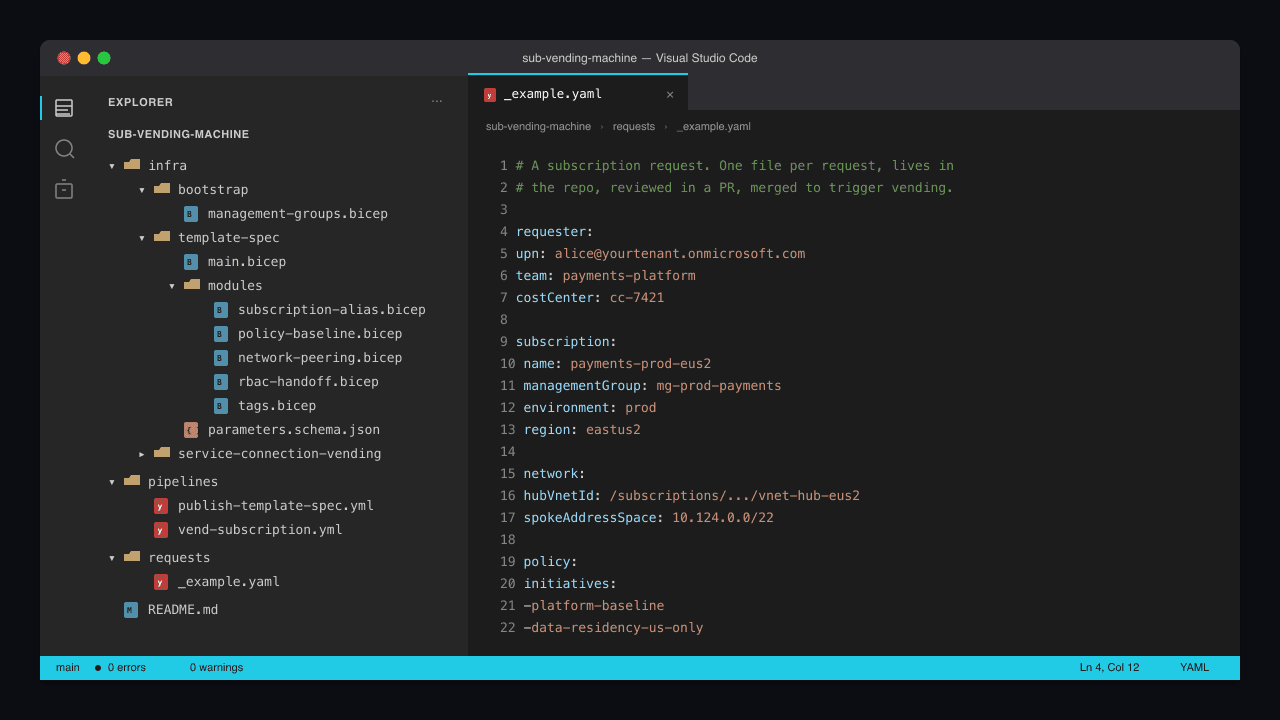
~/sub-vending-machine/
├── infra/
│   ├── bootstrap/
│   │   └── management-groups.bicep
│   ├── template-spec/
│   │   ├── main.bicep
│   │   ├── modules/
│   │   │   ├── subscription-alias.bicep
│   │   │   ├── policy-baseline.bicep
│   │   │   ├── network-peering.bicep
│   │   │   ├── rbac-handoff.bicep
│   │   │   └── tags.bicep
│   │   └── parameters.schema.json
│   └── service-connection-vending/
│       └── create-connection.sh
├── pipelines/
│   ├── publish-template-spec.yml
│   └── vend-subscription.yml
├── requests/
│   └── _example.yaml
└── README.md
Prerequisites
Run each one and confirm:
az --version            # 2.65 or newer
az bicep version        # 0.30 or newer
yq --version            # request files are YAML
Required permissions before you start:
- Owner at the root management group to publish the Template Spec and create subscription aliases
- Subscription Creator role on a billing scope (Enterprise Agreement enrollment account, MCA billing profile, or MPN partner agreement)
- Project Collection Administrator in the Azure DevOps org to provision Service Connections programmatically
A note on the billing scope: subscription creation in 2026 is done through the Subscription Alias API which requires a billing-scope identifier. Get yours from az billing account list and az billing enrollment-account list for EA, or the equivalent MCA cmdlets. Without this, the alias call returns a 400 with a confusing message; the right error message is "you don't have a billing scope linked to this tenant."
Step 1: The request schema
requests/_example.yaml:
# A subscription request. One file per request, lives in the repo, reviewed
# by the platform team in a PR, then merged to trigger the vending pipeline.

requester:
  upn: alice@yourtenant.onmicrosoft.com
  team: payments-platform
  costCenter: cc-7421

subscription:
  name: payments-prod-eus2
  managementGroup: mg-prod-payments
  environment: prod   # dev | test | stage | prod
  region: eastus2

network:
  hubVnetId: /subscriptions/.../resourceGroups/rg-hub/providers/Microsoft.Network/virtualNetworks/vnet-hub-eus2
  spokeAddressSpace: 10.124.0.0/22

policy:
  initiatives:
    - platform-baseline
    - data-residency-us-only
  exemptions: []
Eight inputs. Everything else is derived.
The request lives in a YAML file in the repo because that's the artefact reviewers comment on, the audit log of who-asked-for-what, and the rollback unit if something goes wrong. The pipeline reads it and converts to ARM parameters. Don't take the request as form input; take it as a file. The file is the contract.
Step 2: Bootstrap the management group hierarchy
infra/bootstrap/management-groups.bicep:
targetScope = 'tenant'

param rootMgId string = tenant().tenantId

resource platform 'Microsoft.Management/managementGroups@2023-04-01' = {
  name: 'mg-platform'
  properties: {
    displayName: 'Platform'
    details: {
      parent: {
        id: tenantResourceId('Microsoft.Management/managementGroups', rootMgId)
      }
    }
  }
}

resource workloads 'Microsoft.Management/managementGroups@2023-04-01' = {
  name: 'mg-workloads'
  properties: {
    displayName: 'Workloads'
    details: {
      parent: {
        id: tenantResourceId('Microsoft.Management/managementGroups', rootMgId)
      }
    }
  }
}

resource workloadsProd 'Microsoft.Management/managementGroups@2023-04-01' = {
  name: 'mg-prod-payments'
  properties: {
    displayName: 'Prod, Payments'
    details: {
      parent: {
        id: workloads.id
      }
    }
  }
}

resource workloadsNonProd 'Microsoft.Management/managementGroups@2023-04-01' = {
  name: 'mg-nonprod-payments'
  properties: {
    displayName: 'Non-Prod, Payments'
    details: {
      parent: {
        id: workloads.id
      }
    }
  }
}
Two top-level groups (Platform, Workloads), with Workloads further split by environment-business-unit pairs. Real orgs have more, but the shape is identical: a small platform-management subtree, a workloads subtree segmented by something (business unit, prod-vs-nonprod, or both).
Run once, then forget. The hierarchy stabilises after the first month.
Step 3: The Template Spec body
infra/template-spec/main.bicep:
targetScope = 'managementGroup'

@description('Subscription name (lowercase, alphanumeric + hyphens)')
param subscriptionName string

@description('Target management group resource ID (mg-prod-payments etc.)')
param targetManagementGroupId string

@description('Environment: dev | test | stage | prod')
@allowed(['dev', 'test', 'stage', 'prod'])
param environment string

@description('Azure region for the spoke VNet')
param region string

@description('Hub VNet resource ID for peering')
param hubVnetId string

@description('Spoke VNet address space (e.g. 10.124.0.0/22)')
param spokeAddressSpace string

@description('Requester UPN (will be granted Contributor on the subscription, not Owner)')
param requesterUpn string

@description('Cost center for billing tags')
param costCenter string

@description('Billing scope (EA enrollment account, MCA billing profile, etc.)')
param billingScope string

module subAlias 'modules/subscription-alias.bicep' = {
  name: 'sub-alias'
  params: {
    subscriptionName: subscriptionName
    billingScope: billingScope
    targetManagementGroupId: targetManagementGroupId
  }
}

module tags 'modules/tags.bicep' = {
  name: 'tags'
  scope: subscription(subAlias.outputs.subscriptionId)
  params: {
    environment: environment
    costCenter: costCenter
    requesterUpn: requesterUpn
    createdAt: utcNow('yyyy-MM-dd')
  }
  dependsOn: [ subAlias ]
}

module policy 'modules/policy-baseline.bicep' = {
  name: 'policy'
  scope: subscription(subAlias.outputs.subscriptionId)
  params: {
    environment: environment
  }
  dependsOn: [ subAlias ]
}

module peering 'modules/network-peering.bicep' = {
  name: 'peering'
  scope: subscription(subAlias.outputs.subscriptionId)
  params: {
    hubVnetId: hubVnetId
    spokeName: 'vnet-${subscriptionName}'
    spokeAddressSpace: spokeAddressSpace
    region: region
  }
  dependsOn: [ subAlias ]
}

module rbac 'modules/rbac-handoff.bicep' = {
  name: 'rbac'
  scope: subscription(subAlias.outputs.subscriptionId)
  params: {
    requesterUpn: requesterUpn
  }
  dependsOn: [ subAlias, tags, policy, peering ]
}

output subscriptionId string = subAlias.outputs.subscriptionId
output spokeVnetId string = peering.outputs.spokeVnetId
Five modules, each doing one thing. The dependsOn chain on the RBAC handoff is deliberate: only run the "remove Owner from the platform team's identity, add Contributor to the requester" step after policy, peering, and tags have all succeeded. If any earlier step failed, the platform identity keeps Owner so a human can investigate without the requester having access to a half-built subscription.
Step 4: The subscription alias module
infra/template-spec/modules/subscription-alias.bicep:
targetScope = 'managementGroup'

param subscriptionName string
param billingScope string
param targetManagementGroupId string

resource alias 'Microsoft.Subscription/aliases@2024-08-01' = {
  scope: tenant()
  name: subscriptionName
  properties: {
    displayName: subscriptionName
    workload: 'Production'
    billingScope: billingScope
    additionalProperties: {
      managementGroupId: targetManagementGroupId
    }
  }
}

output subscriptionId string = alias.properties.subscriptionId
The Subscription Alias API is the only programmatic path to creating a subscription in 2026. The alias is a tenant-scoped resource that, once provisioned, holds the subscription's metadata. The actual subscription ID flows out as an output.
The workload: 'Production' value here is a billing classification, not a deployment-tier hint. Set it correctly because it affects which discount tier the subscription rolls up under. The other valid value is DevTest.
Step 5: Baseline policy assignment
infra/template-spec/modules/policy-baseline.bicep:
targetScope = 'subscription'

param environment string

var initiativeId = '/providers/Microsoft.Authorization/policySetDefinitions/platform-baseline'

resource baselineAssignment 'Microsoft.Authorization/policyAssignments@2024-04-01' = {
  name: 'platform-baseline-${environment}'
  properties: {
    displayName: 'Platform Baseline (${environment})'
    policyDefinitionId: initiativeId
    enforcementMode: environment == 'prod' ? 'Default' : 'DoNotEnforce'
  }
  identity: {
    type: 'SystemAssigned'
  }
  location: 'eastus'
}
Audit mode in non-prod, enforcement mode in prod. This is the "ramp from audit to deny" pattern; new rules go through a two-sprint audit window in non-prod before they enforce in prod, which is exactly what your platform-baseline initiative ought to support.
Step 6: Hub VNet peering
infra/template-spec/modules/network-peering.bicep:
targetScope = 'subscription'

param region string
param spokeName string
param spokeAddressSpace string
param hubVnetId string

resource rg 'Microsoft.Resources/resourceGroups@2024-03-01' = {
  name: 'rg-${spokeName}-network'
  location: region
}

module spokeVnet 'spoke-vnet.bicep' = {
  name: 'spoke-vnet'
  scope: rg
  params: {
    region: region
    spokeName: spokeName
    spokeAddressSpace: spokeAddressSpace
  }
}

module peeringSpoke 'peering-spoke.bicep' = {
  name: 'peering-spoke'
  scope: rg
  params: {
    spokeVnetName: spokeVnet.outputs.name
    hubVnetId: hubVnetId
  }
}

// Cross-subscription deployment to add the reverse peering on the hub
module peeringHub 'peering-hub.bicep' = {
  name: 'peering-hub'
  scope: resourceGroup(split(hubVnetId, '/')[2], split(hubVnetId, '/')[4])
  params: {
    hubVnetName: split(hubVnetId, '/')[8]
    spokeVnetId: spokeVnet.outputs.id
  }
}

output spokeVnetId string = spokeVnet.outputs.id
The cross-subscription deployment for the reverse peering is the part most teams get wrong. Peerings are not symmetric automatically; you have to create the spoke-to-hub and hub-to-spoke peering, and the latter has to deploy in the hub's subscription. The platform identity running this Template Spec needs Network Contributor on the hub VNet's resource group for this to work.
If your hub is in a different tenant (multi-tenant orgs), this whole pattern needs adjustment; multi-tenant peering is a different beast and out of scope for this post.
Step 7: RBAC handoff
infra/template-spec/modules/rbac-handoff.bicep:
targetScope = 'subscription'

param requesterUpn string

@description('Object ID of the requester, resolved from UPN by the pipeline')
param requesterObjectId string

resource contribForRequester 'Microsoft.Authorization/roleAssignments@2022-04-01' = {
  name: guid(subscription().id, requesterObjectId, 'contributor')
  properties: {
    principalId: requesterObjectId
    principalType: 'User'
    roleDefinitionId: subscriptionResourceId(
      'Microsoft.Authorization/roleDefinitions',
      'b24988ac-6180-42a0-ab88-20f7382dd24c') // Contributor
  }
}

resource readerForCostCenter 'Microsoft.Authorization/roleAssignments@2022-04-01' = {
  name: guid(subscription().id, requesterObjectId, 'reader-cost')
  properties: {
    principalId: requesterObjectId
    principalType: 'User'
    roleDefinitionId: subscriptionResourceId(
      'Microsoft.Authorization/roleDefinitions',
      '72fafb9e-0641-4937-9268-a91bfd8191a3') // Cost Management Reader
  }
}
Two role assignments: Contributor (so the requester can build their workload) and Cost Management Reader (so they can see what they're spending). Owner is intentionally not assigned. The platform identity that ran the Template Spec retains Owner during provisioning; once provisioning is complete, the pipeline's final step removes that Owner assignment, leaving the subscription in a clean state where the requester is Contributor and the platform team has no standing access (they re-acquire it via PIM if needed).
This is the most-skipped step in vending-machine implementations, and the reason most subscriptions end up with three Owners by month six. The handoff has to be in the template; if it's manual, it gets forgotten.
Step 8: The Azure DevOps pipeline
pipelines/vend-subscription.yml:
trigger:
  branches:
    include: [ main ]
  paths:
    include: [ 'requests/*.yaml' ]
    exclude: [ 'requests/_example.yaml' ]

pool:
  vmImage: ubuntu-latest

variables:
  serviceConnection: 'sc-platform-vending'
  templateSpecVersion: '1.4.0'
  templateSpecScope: '/providers/Microsoft.Management/managementGroups/mg-platform/providers/Microsoft.Resources/templateSpecs/sub-vending'

stages:
  - stage: Validate
    jobs:
      - job: ValidateRequest
        steps:
          - checkout: self
          - bash: |
              # Find the changed YAML request file in this commit
              REQ=$(git diff --name-only HEAD~1..HEAD | grep '^requests/' | grep -v '_example.yaml' | head -1)
              if [ -z "$REQ" ]; then
                echo "##vso[task.logissue type=error]No request file in this PR."
                exit 1
              fi
              echo "##vso[task.setvariable variable=requestFile;isOutput=true]$REQ"
              # Validate against schema
              yq -o json "$REQ" | jq -e '
                .requester.upn and
                .subscription.name and
                .subscription.managementGroup and
                .subscription.environment and
                .network.hubVnetId and
                .network.spokeAddressSpace and
                .policy.initiatives
              ' > /dev/null || (
                echo "##vso[task.logissue type=error]Request file missing required fields"
                exit 1
              )
            name: parseRequest

  - stage: Approve
    dependsOn: Validate
    jobs:
      - deployment: WaitForApproval
        environment: subscription-vending-approval
        strategy:
          runOnce:
            deploy:
              steps:
                - bash: echo "Approval received. Proceeding to provision."

  - stage: Vend
    dependsOn: Approve
    jobs:
      - job: Provision
        steps:
          - checkout: self
          - task: AzureCLI@2
            inputs:
              azureSubscription: $(serviceConnection)
              scriptType: bash
              scriptLocation: inlineScript
              inlineScript: |
                REQ=$(git diff --name-only HEAD~1..HEAD | grep '^requests/' | grep -v '_example.yaml' | head -1)

                # Resolve requester UPN -> object ID
                REQUESTER_UPN=$(yq '.requester.upn' "$REQ")
                REQUESTER_OID=$(az ad user show --id "$REQUESTER_UPN" --query id -o tsv)

                # Build parameters
                PARAMS=$(yq -o json "$REQ" | jq '{
                  subscriptionName:        { value: .subscription.name },
                  targetManagementGroupId: { value: ("/providers/Microsoft.Management/managementGroups/" + .subscription.managementGroup) },
                  environment:             { value: .subscription.environment },
                  region:                  { value: .subscription.region },
                  hubVnetId:               { value: .network.hubVnetId },
                  spokeAddressSpace:       { value: .network.spokeAddressSpace },
                  requesterUpn:            { value: .requester.upn },
                  costCenter:              { value: .requester.costCenter },
                  billingScope:            { value: env.BILLING_SCOPE }
                }' --argjson env "{\"BILLING_SCOPE\":\"$BILLING_SCOPE\"}")

                # Add the resolved object ID
                PARAMS=$(echo "$PARAMS" | jq --arg oid "$REQUESTER_OID" '. + { requesterObjectId: { value: $oid } }')

                # Deploy the Template Spec
                az deployment mg create \
                  --management-group-id mg-platform \
                  --location eastus \
                  --template-spec "$(templateSpecScope)/versions/$(templateSpecVersion)" \
                  --parameters "$PARAMS" \
                  --query 'properties.outputs'

  - stage: ServiceConnection
    dependsOn: Vend
    jobs:
      - job: ProvisionConnection
        steps:
          - bash: ./infra/service-connection-vending/create-connection.sh
The four-stage shape is deliberate: Validate proves the request is well-formed before any human is asked to look at it, Approve gives a platform-team member the chance to sanity-check the request (and to deny it if it's the wrong management group), Vend does the actual provisioning, and ServiceConnection finishes by setting up the Azure DevOps Service Connection so the requester can immediately deploy into their new subscription.
The approval gate at stage 2 is the single most-skipped piece of vending-machine implementations. Without it, anyone who can land a PR into requests/ can create a subscription. With it, every subscription has a named human approval in the pipeline log, which is the answer to "who approved subscription X" for the audit conversation.
Production checklist
Pin the Template Spec version in the pipeline. The example uses
templateSpecVersion: '1.4.0'. Don't uselatest; pinning is what gives you reproducibility.Set a hard limit on subscription creation per month. The Subscription Alias API allows several per day; your billing team probably does not want that. Add a quota check in the Validate stage that counts requests in the current month and rejects if over a threshold.
Tag every subscription with a
created-by-vending-versiontag. Future-you will want to know which subscriptions were created with which Template Spec version when you ship a breaking change.Document the rollback story. Subscriptions can be cancelled but not "rolled back" cleanly. The vending machine should produce a reversal Bicep alongside the deployment, so undoing a vending action is a separate-but-known pipeline.
Run the entire pipeline against a dev billing scope first. EA enrollment-account-A is your production billing scope; carve out a separate dev billing scope for testing the Template Spec changes. The cost of a subscription that exists for an hour is essentially zero.
Troubleshooting
SubscriptionCreationFailed with no detail is almost always a billing scope problem. Confirm with az billing enrollment-account list that the scope you're passing exists and is linked to the tenant the platform identity authenticates against.
AuthorizationFailed: cannot create resource of type 'Microsoft.Subscription/aliases' means the platform identity is missing the Subscription Creator role on the billing scope. Check az role assignment list --assignee <platform-sp-objectid>.
Peering creation failed: hub VNet not found is usually a cross-subscription RBAC problem. The platform identity needs Network Contributor on the hub VNet's resource group, in the hub's subscription, not the new subscription's.
Policy assignment fails with 'PolicyDefinitionNotFound' means the platform-baseline initiative hasn't been published at root MG scope yet, or has been published at a different MG and the path doesn't resolve. The initiative must be visible from the subscription's effective policy hierarchy; root-MG is the safe place.
RBAC handoff says role already exists happens when the request file is being re-applied for a subscription that already went through vending. The pipeline should make this a no-op; the role assignment name uses guid(subscription().id, requesterObjectId, 'contributor') which is deterministic, so re-running is safe.
What this changes about how the platform team operates
Before vending, the platform team was the bottleneck for new subscriptions. Each request consumed a few hours of senior architect time spread over two weeks of waiting. Multiply by the rate at which the org needs subscriptions (roughly one per week at our scale) and that's a non-trivial fraction of the team's senior capacity, spent on work that's identical from one subscription to the next.
After vending, the platform team writes the Template Spec, reviews PRs containing request files (which is a quick read of a YAML file), and approves the pipeline gate. Total time per request: under five minutes. The senior architects spend their freed time on harder problems: actual architecture review for unusual workloads, capacity planning, evaluating new Azure services for landing-zone fit. The platform team's work shifts from "operating the queue" to "improving the queue."
The cultural change is the part most teams underestimate. When a subscription request takes two weeks, developer teams hoard subscriptions. They ask for one big one and stuff multiple workloads into it because the cost of asking for another is too high. This concentrates blast radius, breaks the "subscription as security boundary" model, and produces the long-tail cost-allocation headaches the FinOps team will fight for the next two years. When provisioning takes nine minutes, developers start asking for the right number of subscriptions, with the right names, in the right management groups, the first time. The vending machine doesn't just speed up provisioning; it changes the architecture of how the org uses Azure. That's the real deliverable, and it's worth the 600 lines of Bicep and the week of plumbing it took to ship.
Six months in, our org has provisioned 73 subscriptions through this vending machine. The platform team has touched zero of them manually. The audit conversation about "show me how subscriptions get created" takes ninety seconds: open the Template Spec page in the portal, point at the version pin in the pipeline, show the approval log. The pre-vending version of that conversation took an hour.
Conversation
Reactions & commentsLiked this? Tap a reaction. Want to push back, share a war story, or ask a follow-up? Drop a comment below — replies are threaded and markdown works.