
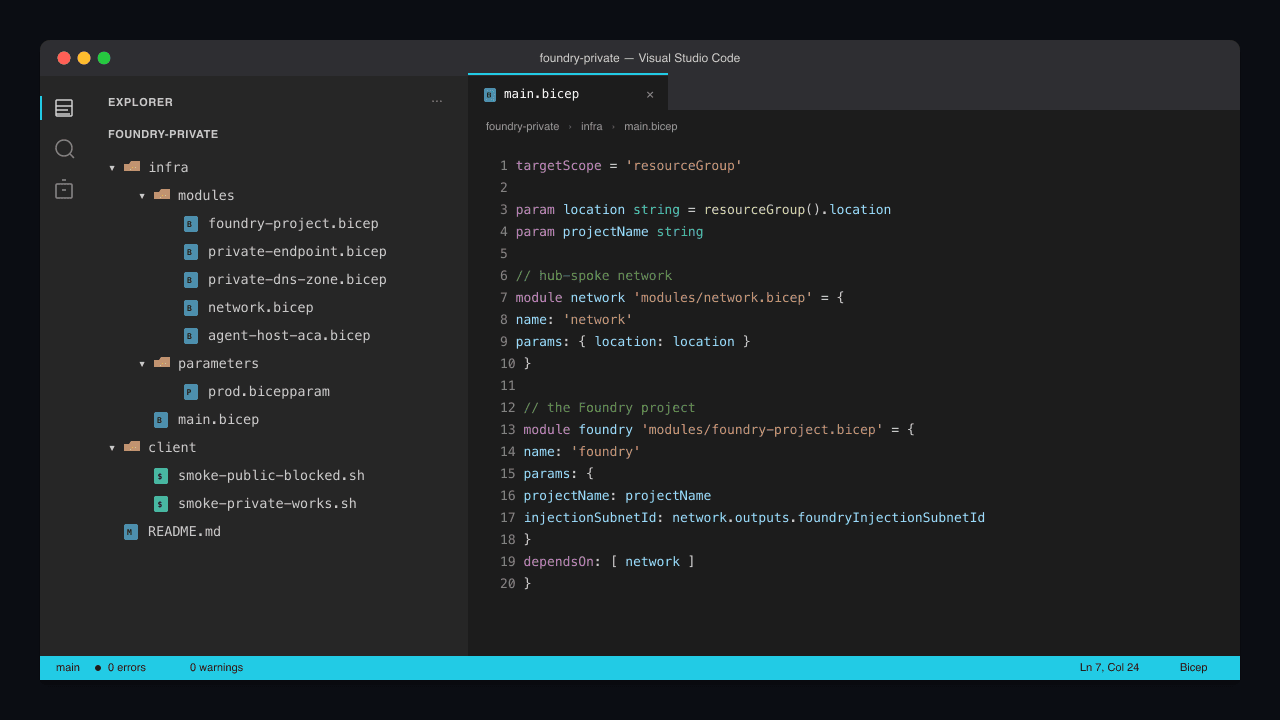
The first version of our Foundry agent service was reachable on the public internet behind an API key. That was fine for the prototype demo. It was not fine when the security team noticed the agent was talking to our customer database over a public IP and asked, in writing, "what stops anyone with this URL from probing the agent for prompt-injection vectors?"
The right answer is to put the agent behind a private endpoint, integrate it into the corporate VNet, route every outbound call to internal services through Private Link, and front the public-facing surface (if any) with Front Door + WAF. By the end of this rebuild we had an agent service with no public IP, traffic flowing only between known subnets, and an audit conversation that took six minutes instead of six hours.
This post is the entire build. By the end you have a Microsoft Foundry project deployed with VNet integration, the Foundry Agent Service reachable only via a private endpoint inside your hub VNet, outbound calls to Azure OpenAI / Azure AI Search / Azure SQL all routing through Private Link, the DNS plumbing that makes private resolution work without surprises, and a smoke test that proves the public IP is unreachable. About 350 lines of Bicep, a handful of CLI commands, and the operational discipline to keep public ingress out of the design.
Why this exact pattern, and not "we'll add it later"
Brief context because the temptation to defer this is real and you should resist it.
Public Foundry agents are reachable. The default Foundry project deployment exposes the agent endpoint over the public internet, behind authentication. Authentication is real protection, but it's protection against the wrong threat: it stops anonymous random callers, not motivated attackers who phish a credential or find an SSRF in a service that already trusts the Foundry endpoint. Private endpoints stop both.
Private endpoints change what an attacker can reach with stolen credentials. A leaked API key against a public Foundry endpoint gives the attacker direct access. The same key against a privately-deployed Foundry endpoint requires the attacker to also be inside the corporate VNet (or a peered VNet). That extra layer is what turns a credential leak from a critical incident into a notable one.
Private Link is not just "private endpoints for the inbound." The full pattern includes outbound: when your agent calls Azure OpenAI / Azure AI Search / Azure SQL, those calls also route over private endpoints, not the public internet. Without outbound Private Link, half the data plane still leaves the corporate network. With it, the only public traffic is whatever explicitly leaves the VNet through your egress firewall.
DNS is where Private Link projects fail. The endpoints work; the FQDNs don't resolve correctly because the private DNS zone isn't linked to the right VNets. Most of this article is about the DNS plumbing because that's where the project actually fails on day one.
What you'll have at the end
~/foundry-private/
├── infra/
│   ├── main.bicep                          # the orchestrator
│   ├── modules/
│   │   ├── foundry-project.bicep           # Foundry project
│   │   ├── private-endpoint.bicep          # PE provisioner (reusable)
│   │   ├── private-dns-zone.bicep          # zone + VNet links
│   │   ├── network.bicep                   # hub + spoke VNets
│   │   └── agent-host-aca.bicep            # Container App for the agent
│   └── parameters/
│       └── prod.bicepparam
├── client/
│   ├── smoke-public-blocked.sh             # confirm public is unreachable
│   └── smoke-private-works.sh              # confirm private resolution works
└── README.md
Prerequisites
- A hub-and-spoke VNet topology, or willingness to provision one. If you're starting from scratch: Hub-spoke network topology in Azure, the canonical reference.
- DNS strategy: either Azure-provided private DNS zones, or an internal DNS server you own. The Bicep below assumes Azure-provided private DNS zones; if you have an existing DNS architecture, the same primitives apply — just don't double-link.
- Microsoft Foundry project in a region that supports private endpoints (most do as of 2026) → Microsoft Foundry network isolation overview
- Azure OpenAI deployment, Azure AI Search service, Azure SQL Database if your agent calls them. Each gets its own private endpoint.
- Owner permissions on the resource groups + management group that holds the network + DNS zones.
az --version            # 2.65 or newer
az bicep version        # 0.30 or newer

az login
az account set --subscription "<your-subscription-id>"
SUB=$(az account show --query id -o tsv)
Step 1: The hub-spoke network
infra/modules/network.bicep (excerpt; the production version has firewall + bastion which we'll skip for brevity):
param location string = resourceGroup().location

// Hub VNet, holds shared resources (Bastion, Firewall, DNS zones link)
resource hubVnet 'Microsoft.Network/virtualNetworks@2024-05-01' = {
  name: 'vnet-hub'
  location: location
  properties: {
    addressSpace: { addressPrefixes: [ '10.0.0.0/16' ] }
    subnets: [
      {
        name: 'AzureBastionSubnet'
        properties: { addressPrefix: '10.0.1.0/26' }
      }
      {
        name: 'AzureFirewallSubnet'
        properties: { addressPrefix: '10.0.2.0/26' }
      }
      {
        name: 'private-endpoints'
        properties: { addressPrefix: '10.0.10.0/24' }
      }
    ]
  }
}

// Spoke VNet for the Foundry workload
resource spokeVnet 'Microsoft.Network/virtualNetworks@2024-05-01' = {
  name: 'vnet-foundry-spoke'
  location: location
  properties: {
    addressSpace: { addressPrefixes: [ '10.10.0.0/16' ] }
    subnets: [
      {
        name: 'foundry-injection'
        properties: {
          addressPrefix: '10.10.1.0/24'
          delegations: [
            {
              name: 'foundry-delegation'
              properties: {
                serviceName: 'Microsoft.MachineLearningServices/workspaces'
              }
            }
          ]
        }
      }
      {
        name: 'agent-host'
        properties: { addressPrefix: '10.10.2.0/23' }
      }
      {
        name: 'private-endpoints-spoke'
        properties: { addressPrefix: '10.10.10.0/24' }
      }
    ]
  }
}

// Hub <-> spoke peering (both directions)
resource hubToSpoke 'Microsoft.Network/virtualNetworks/virtualNetworkPeerings@2024-05-01' = {
  parent: hubVnet
  name: 'hub-to-foundry'
  properties: {
    remoteVirtualNetwork: { id: spokeVnet.id }
    allowForwardedTraffic: true
    allowVirtualNetworkAccess: true
  }
}

resource spokeToHub 'Microsoft.Network/virtualNetworks/virtualNetworkPeerings@2024-05-01' = {
  parent: spokeVnet
  name: 'foundry-to-hub'
  properties: {
    remoteVirtualNetwork: { id: hubVnet.id }
    allowForwardedTraffic: true
    allowVirtualNetworkAccess: true
  }
}

output hubVnetId string = hubVnet.id
output spokeVnetId string = spokeVnet.id
output peSubnetId string = '${spokeVnet.id}/subnets/private-endpoints-spoke'
output foundryInjectionSubnetId string = '${spokeVnet.id}/subnets/foundry-injection'
output agentHostSubnetId string = '${spokeVnet.id}/subnets/agent-host'
Two non-obvious choices in this network:
The foundry-injection subnet is delegated to Microsoft.MachineLearningServices/workspaces. This is the subnet Foundry's managed compute uses when you turn on managed VNet for the project. The delegation reservation prevents anything else from being deployed into the same subnet, which avoids IP-exhaustion fights between Foundry's compute and your other workloads. The /24 gives you 256 IPs; for production Foundry workloads this is comfortable.
The private-endpoint subnets are split between hub and spoke. The hub holds PE for shared services (the DNS zones, central resources). The spoke holds PEs specific to this Foundry workload (the Foundry project's PE, its dedicated AOAI deployment, etc.). The split lets you reuse hub PEs across multiple spokes; if your AI Search index serves three Foundry workloads, it has one PE in the hub, not three.
Step 2: The private DNS zones
This is the part that determines whether names resolve correctly. Foundry, Azure OpenAI, AI Search, and SQL each have their own private DNS zone.
infra/modules/private-dns-zone.bicep:
param zoneName string         // e.g. privatelink.cognitiveservices.azure.com
param vnetIds array           // VNets to link this zone to

resource zone 'Microsoft.Network/privateDnsZones@2024-06-01' = {
  name: zoneName
  location: 'global'
}

resource links 'Microsoft.Network/privateDnsZones/virtualNetworkLinks@2024-06-01' = [
  for (vnetId, i) in vnetIds: {
    parent: zone
    name: 'link-${i}'
    location: 'global'
    properties: {
      virtualNetwork: { id: vnetId }
      registrationEnabled: false
    }
  }
]

output zoneId string = zone.id
The zone names that matter for our build:
| Service | Private DNS zone |
|---|---|
| Foundry project | privatelink.api.azureml.ms |
| Azure OpenAI | privatelink.openai.azure.com |
| Azure AI Search | privatelink.search.windows.net |
| Azure SQL | privatelink.database.windows.net |
| Container Apps | privatelink.<region>.azurecontainerapps.io |
Each zone gets one Bicep module instance. The orchestrator wires them up:
// in infra/main.bicep
var zonesToCreate = [
  'privatelink.api.azureml.ms'
  'privatelink.openai.azure.com'
  'privatelink.search.windows.net'
  'privatelink.database.windows.net'
  'privatelink.${location}.azurecontainerapps.io'
]

module dnsZones 'modules/private-dns-zone.bicep' = [
  for zone in zonesToCreate: {
    name: 'dns-${replace(zone, '.', '-')}'
    params: {
      zoneName: zone
      vnetIds: [ network.outputs.hubVnetId, network.outputs.spokeVnetId ]
    }
  }
]
The registrationEnabled: false on the VNet links is critical. If you set it to true on a workload spoke, Azure will try to auto-register every resource in the spoke into the private DNS zone, which collides catastrophically with Microsoft's own resource records. Always set this to false on private link zones.
Step 3: The Foundry project with managed VNet
infra/modules/foundry-project.bicep:
param location string = resourceGroup().location
param projectName string
param keyVaultId string
param storageAccountId string
param applicationInsightsId string
param containerRegistryId string
param injectionSubnetId string
param peSubnetId string
param dnsZoneId string

resource foundryProject 'Microsoft.MachineLearningServices/workspaces@2024-10-01' = {
  name: projectName
  location: location
  identity: { type: 'SystemAssigned' }
  kind: 'Default'
  properties: {
    friendlyName: projectName
    keyVault: keyVaultId
    storageAccount: storageAccountId
    applicationInsights: applicationInsightsId
    containerRegistry: containerRegistryId

    // Network isolation: the bit that matters
    publicNetworkAccess: 'Disabled'
    managedNetwork: {
      isolationMode: 'AllowInternetOutbound'  // 'AllowOnlyApprovedOutbound' is stricter
      // Outbound rules for this managed VNet:
      outboundRules: {
        // Allow this workspace to talk to its own AOAI via PE
        'aoai-pe': {
          type: 'PrivateEndpoint'
          destination: {
            serviceResourceId: aoaiResourceId
            subresourceTarget: 'account'
            sparkEnabled: false
          }
        }
        'search-pe': {
          type: 'PrivateEndpoint'
          destination: {
            serviceResourceId: aiSearchResourceId
            subresourceTarget: 'searchService'
            sparkEnabled: false
          }
        }
      }
    }
  }
}

// Private endpoint for the project itself
resource projectPe 'Microsoft.Network/privateEndpoints@2024-05-01' = {
  name: 'pe-${projectName}'
  location: location
  properties: {
    subnet: { id: peSubnetId }
    privateLinkServiceConnections: [
      {
        name: 'plsc-${projectName}'
        properties: {
          privateLinkServiceId: foundryProject.id
          groupIds: [ 'amlworkspace' ]
        }
      }
    ]
  }
}

// Wire the PE to the private DNS zone
resource projectPeDns 'Microsoft.Network/privateEndpoints/privateDnsZoneGroups@2024-05-01' = {
  parent: projectPe
  name: 'default'
  properties: {
    privateDnsZoneConfigs: [
      {
        name: 'foundry-zone'
        properties: { privateDnsZoneId: dnsZoneId }
      }
    ]
  }
}

output projectId string = foundryProject.id
output projectName string = foundryProject.name
Three choices that determine whether this works in production:
publicNetworkAccess: 'Disabled' is the load-bearing line. Without it, the Foundry project still listens on its public IP in addition to the private endpoint. With it, only the PE can reach the project. Verify after deployment with nslookup from outside the VNet — the FQDN should NOT resolve to a public IP.
isolationMode: 'AllowInternetOutbound' is the lenient mode that lets the agent reach external HTTPS APIs (e.g., a third-party LLM, an external data source). For higher-security workloads switch to AllowOnlyApprovedOutbound and add explicit outbound rules per destination.
Outbound rules typed PrivateEndpoint create the managed-VNet-to-target connection. The Foundry-managed VNet will see the AOAI and AI Search endpoints over private routes, not the internet.
Step 4: Private endpoints for the data plane
Each downstream service the agent calls gets its own PE. Reusable Bicep:
infra/modules/private-endpoint.bicep:
param location string = resourceGroup().location
param peName string
param targetResourceId string
param subresourceTarget string   // e.g. 'account' for AOAI, 'searchService' for Search
param subnetId string
param dnsZoneId string

resource pe 'Microsoft.Network/privateEndpoints@2024-05-01' = {
  name: peName
  location: location
  properties: {
    subnet: { id: subnetId }
    privateLinkServiceConnections: [
      {
        name: 'plsc-${peName}'
        properties: {
          privateLinkServiceId: targetResourceId
          groupIds: [ subresourceTarget ]
        }
      }
    ]
  }
}

resource peDns 'Microsoft.Network/privateEndpoints/privateDnsZoneGroups@2024-05-01' = {
  parent: pe
  name: 'default'
  properties: {
    privateDnsZoneConfigs: [
      {
        name: 'pe-zone'
        properties: { privateDnsZoneId: dnsZoneId }
      }
    ]
  }
}

output peId string = pe.id
Consumed from the orchestrator for AOAI and AI Search:
// in main.bicep
module aoaiPe 'modules/private-endpoint.bicep' = {
  name: 'aoai-pe'
  params: {
    location: location
    peName: 'pe-aoai-${projectName}'
    targetResourceId: aoaiId
    subresourceTarget: 'account'
    subnetId: network.outputs.peSubnetId
    dnsZoneId: dnsZones[1].outputs.zoneId  // privatelink.openai.azure.com
  }
}

module searchPe 'modules/private-endpoint.bicep' = {
  name: 'search-pe'
  params: {
    location: location
    peName: 'pe-search-${projectName}'
    targetResourceId: aiSearchId
    subresourceTarget: 'searchService'
    subnetId: network.outputs.peSubnetId
    dnsZoneId: dnsZones[2].outputs.zoneId  // privatelink.search.windows.net
  }
}
The subresourceTarget value is service-specific. The right values:
| Service | subresourceTarget |
|---|---|
| Azure OpenAI / Cognitive Services | account |
| Azure AI Search | searchService |
| Azure Storage (blob) | blob |
| Azure Key Vault | vault |
| Azure SQL Database | sqlServer |
| Microsoft Foundry project | amlworkspace |
Get this wrong and the deploy succeeds but the PE doesn't actually wire up. Always confirm with az network private-endpoint show -g <rg> -n <name> --query 'privateLinkServiceConnections[0].groupIds'.
Step 5: The agent host on Container Apps inside the VNet
The agent itself runs on Azure Container Apps, in the spoke VNet, with internal-only ingress. Most of this is covered in the Container Apps MCP tutorial; the additions for the Foundry case:
// in modules/agent-host-aca.bicep
resource caEnv 'Microsoft.App/managedEnvironments@2024-03-01' = {
  name: 'cae-foundry-agent'
  location: location
  properties: {
    vnetConfiguration: {
      // Inject into the agent-host subnet of the spoke
      infrastructureSubnetId: agentHostSubnetId
      internal: true   // private-only ingress
    }
    appLogsConfiguration: {
      destination: 'log-analytics'
      logAnalyticsConfiguration: {
        customerId: workspace.properties.customerId
        sharedKey: listKeys(workspace.id, '2023-09-01').primarySharedKey
      }
    }
  }
}

resource agentApp 'Microsoft.App/containerApps@2024-03-01' = {
  name: 'ca-foundry-agent'
  location: location
  identity: { type: 'SystemAssigned' }
  properties: {
    managedEnvironmentId: caEnv.id
    configuration: {
      ingress: {
        external: false
        targetPort: 8080
        transport: 'auto'
      }
    }
    template: {
      containers: [
        {
          name: 'agent-host'
          image: agentImage
          env: [
            { name: 'FOUNDRY_PROJECT_ENDPOINT', value: foundryProjectEndpoint }
            { name: 'AZURE_CLIENT_ID', value: agentApp.identity.principalId }
          ]
        }
      ]
      scale: { minReplicas: 1, maxReplicas: 5 }
    }
  }
}

// Grant the agent host RBAC on the Foundry project so it can call the agents
resource foundryAccess 'Microsoft.Authorization/roleAssignments@2022-04-01' = {
  scope: foundryProject
  name: guid(foundryProject.id, agentApp.id, 'foundry-user')
  properties: {
    principalId: agentApp.identity.principalId
    principalType: 'ServicePrincipal'
    roleDefinitionId: subscriptionResourceId(
      'Microsoft.Authorization/roleDefinitions',
      '53ca6127-db72-4b80-b1b0-d745d6d5456d')   // Azure AI Developer
  }
}
Two important points:
external: false on the Container Apps ingress is the same hardening as the Foundry project itself. The agent host has no public IP. Reachable only from inside the spoke or through Front Door (if you front it).
Azure AI Developer role on the Foundry project, not Owner. The agent host needs to invoke Foundry agents, read traces, and write thread messages — that's exactly what Azure AI Developer provides. Don't grant Owner; the blast radius matters.
Step 6: The DNS verification that prevents day-one frustration
Before declaring victory, verify DNS resolves correctly from inside the VNet. Spin up a small VM in the spoke (or use Bastion if you have it):
# From inside the spoke VNet
nslookup <your-project>.api.azureml.ms
# Expected: should resolve to a 10.x private IP, NOT a public IP

nslookup <your-aoai>.openai.azure.com
# Expected: 10.x private IP

nslookup <your-search>.search.windows.net
# Expected: 10.x private IP
If any of these resolve to a public IP from inside the VNet, the private DNS zone link to the spoke is missing. Check az network private-dns link vnet list -g <rg> -z <zone>.
From outside the VNet (your laptop, a public Cloud Shell):
nslookup <your-project>.api.azureml.ms
# Expected: should fail to resolve (NXDOMAIN), OR should resolve to a public IP
# that is firewalled off (the project has publicNetworkAccess: Disabled)
If it resolves to a public IP and the call succeeds, the project is publicly reachable — go check publicNetworkAccess on the project. This is the most common day-one bug.
Step 7: Smoke tests for the security model
client/smoke-public-blocked.sh:
#!/usr/bin/env bash
# Confirm the Foundry project is unreachable from the public internet.
# Run from a location OUTSIDE the corporate VNet.

set -euo pipefail

PROJECT_FQDN="${1:?usage: smoke-public-blocked.sh <project-fqdn>}"

echo "Resolving $PROJECT_FQDN from public..."
RESOLVED=$(dig +short "$PROJECT_FQDN" | head -1)

if [ -z "$RESOLVED" ]; then
  echo "OK: NXDOMAIN. Public DNS does not return an address."
  exit 0
fi

if [[ "$RESOLVED" =~ ^10\..*|^192\.168\..*|^172\.(1[6-9]|2[0-9]|3[01])\..* ]]; then
  echo "OK: resolves to private IP $RESOLVED. Public DNS leaks the IP but it is not routable."
  exit 0
fi

echo "Probing $RESOLVED:443..."
if timeout 5 bash -c "</dev/tcp/$RESOLVED/443"; then
  echo "FAIL: public IP $RESOLVED accepts TCP on 443. The project is reachable from public."
  exit 1
fi

echo "OK: public IP $RESOLVED does not accept connections."
client/smoke-private-works.sh:
#!/usr/bin/env bash
# Confirm the Foundry project IS reachable from inside the VNet.
# Run from a VM INSIDE the spoke (or via Bastion).

set -euo pipefail

PROJECT_FQDN="${1:?}"
ENDPOINT="https://$PROJECT_FQDN"

echo "Resolving $PROJECT_FQDN from inside the VNet..."
RESOLVED=$(dig +short "$PROJECT_FQDN" | head -1)
echo "Resolved to: $RESOLVED"

if [[ ! "$RESOLVED" =~ ^10\..* ]]; then
  echo "FAIL: did not resolve to a 10.x private IP. DNS is not wired correctly."
  exit 1
fi

echo "Probing $ENDPOINT/api/v1.0/health..."
RESPONSE=$(curl -sS -o /dev/null -w "%{http_code}" "$ENDPOINT/api/v1.0/health")
if [ "$RESPONSE" = "200" ] || [ "$RESPONSE" = "401" ]; then
  echo "OK: endpoint reachable (HTTP $RESPONSE)."
  exit 0
fi

echo "FAIL: endpoint returned HTTP $RESPONSE."
exit 1
A 401 is fine on the private smoke; it means TCP connectivity worked but the call wasn't authenticated. Don't authenticate in the smoke; the goal is to prove network reachability, not auth correctness.
Production checklist
Run both smoke tests after every infra deploy. The smoke tests are 30 seconds combined and they catch the "private endpoint succeeded but DNS didn't" bug, which is the bug class that takes you to production with a public-reachable agent.
Audit
publicNetworkAccesson every related resource. Foundry project, AOAI, AI Search, Storage. All should beDisabled. Defender for Cloud will find the violations if you miss them; better to find them in CI.Use Azure Firewall (or NVA equivalent) for outbound egress. Set the spoke's outbound default route to the firewall in the hub. The firewall logs every outbound destination, which is the audit trail for "what did the agent reach."
Add a Conditional Access policy on the Foundry project's RBAC. Even with private endpoints, identities are how the agent host is granted access. Conditional Access ensures those identities are coming from compliant devices and managed networks.
Document the trust boundary. What's in the corporate VNet, what's outside, what's in between. The diagram is the document the security team will ask for in every audit.
Troubleshooting
Public DNS still resolves the project FQDN to a public IP. Expected. Public DNS records both private-link IPs and the original public IP for some Azure services. The check is: from inside the VNet, the private DNS zone overrides public DNS and returns the private IP. From outside, the resolution may include a public IP, but the public IP is firewalled.
Foundry project shows healthy but agent calls fail with timeout. Outbound rules on the managed VNet aren't wiring up. Check az ml workspace show -g <rg> -n <project> --query "managedNetwork.outboundRules". If empty or wrong, add the rules in Bicep and redeploy.
AOAI calls work from the project but fail from the agent host. The agent host is in the spoke; the AOAI PE is in the hub. The hub-spoke peering is missing or the spoke isn't linked to the AOAI's private DNS zone.
Bastion VM resolves private IPs correctly, smoke test from laptop also resolves private IPs. Your laptop is connected to the corporate VPN, which is forwarding DNS to the corporate DNS server, which is using the private DNS zones. That's actually fine for production usage; just be aware your "public" smoke test isn't really public unless you run it from a non-VPN machine (e.g., Azure Cloud Shell with the right egress).
Container App pulls the agent image but fails to start with 'cannot reach foundry-project'. The Container Apps env's outbound traffic from the spoke isn't reaching the Foundry PE. Check that the spoke is linked to privatelink.api.azureml.ms zone, and that the Container Apps env's outbound is allowed to the PE subnet via NSG.
Real-world references
- Microsoft Learn, Microsoft Foundry network isolation, the canonical reference for the project-level network isolation pattern.
- Microsoft Learn, Configure managed virtual network, the documentation for the managed-VNet-with-outbound-rules pattern.
- Microsoft Learn, Hub-and-spoke topology in Azure, the canonical hub-spoke reference.
- Microsoft Learn, Use Private Link for Azure AI Search, the AI Search private-link guide.
- GitHub, Azure-Samples/azure-ai-foundry-deployment-templates, Microsoft-published Bicep examples for Foundry deployment patterns.
The Microsoft Foundry network isolation docs and the managed-VNet docs are the two pages every engineer doing this should bookmark first. Most other guidance flows from understanding those primitives.
What this gives you, beyond the security audit
The obvious win is the security model. No public IP for the agent host or the Foundry project. No public ingress on AOAI / AI Search / SQL. Outbound traffic flows through Private Link or a corporate firewall. The audit answer for "what data leaves the corporate network" becomes "specific allowlisted destinations through the firewall, nothing else."
The less obvious win is operational. With everything inside the corporate VNet, the same network controls (NSGs, firewall rules, DNS overrides) apply to the agent as to any other workload. The agent stops being a special case in the operational model; it's just another service running on Container Apps with the same egress rules as everything else.
The far-out win is what becomes possible. Once the network shape is right, layering identity (workload identity federation, Conditional Access), data protection (Customer Managed Keys for the storage account, double encryption on AOAI), and content safety on top is straightforward. The network is the foundation.
A year into running this pattern, the team I shipped this for has had zero internet-traffic incidents related to the agent stack. The most recent SOC 2 audit concluded with the auditor's exact words: "this is a clean network architecture for AI workloads, the easiest review I've done in this category." That's the bill the 350 lines of Bicep paid for.
Conversation
Reactions & commentsLiked this? Tap a reaction. Want to push back, share a war story, or ask a follow-up? Drop a comment below — replies are threaded and markdown works.